ई-कॉमर्स plugins
Medusa v2 plugin
Install MakePay 1.0.0 in Medusa 2.17.2 or newer, connect with OAuth or API keys, and reconcile hosted checkout in Medusa Admin.
MakePay for Medusa v2
Overview
@makecrypto/medusa-plugin-makepay adds hosted MakePay checkout to Medusa v2.
Version 1.0.1 keeps the payment provider, OAuth connection, API routes,
database migrations, Admin pages, and order widget in one package. Do not
install a separate Admin extension.
The recommended flow creates the Medusa order in pending_authorization
before the shopper leaves the storefront. MakePay then sends a signed webhook
to authorize the payment, and the order remains available in Medusa Admin even
when the shopper closes the checkout tab.
The provider ID remains pp_makepay_makepay, so an existing region does not
need to switch to a new provider identifier during the upgrade. It must still
have pp_makepay_makepay enabled under Payment Providers.
Requirements
- Node.js 22 or newer.
- Medusa
2.17.2or newer and lower than Medusa 3. - PostgreSQL available to the Medusa backend.
- A public HTTPS Medusa backend URL for OAuth callbacks and MakePay webhooks.
localhostis accepted for browser OAuth development, but MakePay cannot deliver a webhook to it without an HTTPS tunnel. - A MakePay merchant account fully set and active.
Keep the Medusa backend, Admin, and storefront origins in your Medusa CORS configuration. OAuth tokens, API keys, DPoP keys, encryption keys, and webhook secrets are backend-only values.
Install the plugin
Install the released package from the Medusa backend directory:
npm install --save-exact @makecrypto/medusa-plugin-makepay@1.0.1
Add the package to medusa-config.ts. The plugin registration loads its
modules, routes, migrations, and Admin extension. The payment-module provider
registration makes the provider available to regions. Pass the same options
object to both registrations:
import { defineConfig, loadEnv } from "@medusajs/framework/utils";

loadEnv(process.env.NODE_ENV || "development", process.cwd());

const makepayOptions = {
  authMode: "oauth" as const,
  backendUrl: process.env.MAKEPAY_BACKEND_URL,
  storefrontReturnUrl: process.env.MAKEPAY_STOREFRONT_RETURN_URL,
  encryptionKey: process.env.MAKEPAY_ENCRYPTION_KEY,
  lockingProvider: "makepay-postgres",
  adminPath: process.env.MEDUSA_ADMIN_PATH || "/app",
};

export default defineConfig({
  projectConfig: {
    // Keep the rest of your Medusa project configuration here.
  },
  plugins: [
    {
      resolve: "@makecrypto/medusa-plugin-makepay",
      options: makepayOptions,
    },
  ],
  modules: [
    {
      resolve: "@medusajs/medusa/locking",
      options: {
        providers: [
          {
            resolve: "@medusajs/medusa/locking-postgres",
            id: "makepay-postgres",
            is_default: true,
          },
        ],
      },
    },
    {
      resolve: "@medusajs/medusa/payment",
      options: {
        providers: [
          {
            resolve: "@makecrypto/medusa-plugin-makepay/providers/makepay",
            id: "makepay",
            options: makepayOptions,
          },
        ],
      },
    },
  ],
});
The PostgreSQL locking provider is bundled with Medusa. OAuth startup rejects
a missing or in-memory lockingProvider, because concurrent backend workers
must serialize token refresh and payment-event processing. Pass the same
makepayOptions object to the plugin and payment provider so both resolve the
makepay-postgres provider configured above.
A store that has only ever used the legacy API-key integration can omit
lockingProvider. If a store has OAuth history or is changing authentication
mode, every worker must first be stopped and restarted with the same
distributed provider; API-key checkout after OAuth history is rejected without
that cross-worker transition lock.
Generate a dedicated 32-byte encryption key and store its base64 value in the Medusa backend secret manager:
openssl rand -base64 32
MAKEPAY_BACKEND_URL=https://api.shop.example
MAKEPAY_STOREFRONT_RETURN_URL=https://shop.example/checkout/makepay/return
MAKEPAY_ENCRYPTION_KEY=<base64-encoded-32-byte-key>
MEDUSA_ADMIN_PATH=/app
Run Medusa migrations after installing or upgrading the plugin:
npx medusa db:migrate
The migration creates only MakePay-owned tables. It does not rewrite Medusa orders, payment sessions, regions, or existing provider data.
Configure authentication
Connect with OAuth
Start the backend and Admin, then open Settings > MakePay at
/app/settings/makepay. Select Connect MakePay, sign in, choose the company
that should receive payments, and approve these least-privilege scopes:
company:readmakepay:payment-links:readmakepay:payment-links:writemakepay:webhooks:readmakepay:webhooks:write
The plugin registers a public per-installation OAuth client, uses Authorization Code with PKCE, and sends DPoP-bound access tokens. It stores the rotating refresh token, DPoP private key, and installation webhook secret encrypted in the Medusa database. MakePay creates a webhook subscription for this installation instead of changing the company's legacy global callback.
Native registration proves possession of the private key matching the
submitted DPoP thumbprint. Registering a replacement key additionally requires
proof from the currently accepted installation key. MakeCrypto derives the
official MakePay name, icon, policies, and support links from the immutable
Medusa template; siteName, Medusa version, and plugin version remain
non-brand support and Connected Apps metadata.
The settings page shows company identity, granted scopes, the next access-token
renewal time, webhook health, callback URL, and the last non-secret connection
error. It never returns token or secret values to the browser. Access tokens are
short-lived, but the official Medusa connection has no inactivity expiry: the
plugin refreshes and persists each rotating token automatically, including
after more than 30 days without a checkout. A displayed access-token expiry is
therefore not a disconnect. Only an explicit disconnect, revocation, security
reset, or unrecoverable refresh-family failure ends the connection. Use
Reconnect after changing the backend URL or scopes. Disconnect disables association of new links
with the installation webhook while preserving its endpoint and signing
identity for already-issued links, revokes the grant, and wipes active local
connection credentials only after the remote reset succeeds. If remote cleanup
or revocation fails, the plugin retains the encrypted credentials and durable
reset mutation identity needed to retry and reports disconnect_pending
instead of pretending the connection is safely removed.
After a successful disconnect, the active OAuth tokens, DPoP key, and current
connection secret are gone. The plugin retains a separately encrypted
historical webhook-subscription credential only for signed late or redelivered
events that match an already-issued payment's exact company, grant,
installation, subscription, UID, and Medusa session. This credential is never
returned to Admin and cannot authorize a new checkout. MakeCrypto limits those
historical deliveries to canonical Medusa payment-status data. Keep the
encryption key, plugin tables, and MakePay webhook endpoint
/hooks/makepay/makepay_makepay available until every issued link is safely
drained; a successful disconnect is not permission to delete
settlement-verification history.
This historical-delivery exception exists only for the immutable official Medusa installation identity. Disabled non-Medusa OAuth subscriptions do not receive events. Version 1.0.0 does not automatically purge the retained Medusa credential: it remains encrypted, inaccessible through Admin or secret-bearing API responses, and bound by database references while an issued link or queued delivery may still settle. Do not delete that row separately from its historical payment and delivery records.
Reconnect key rotation is deliberately zero-downtime. The plugin persists the new DPoP private key before registering it, and the existing token family stays usable if the merchant closes or rejects the subsequent consent screen. Once consent completes, MakeCrypto binds the grant to the new key and revokes every access and refresh token from the old family. Do not clear the plugin database between registration and consent. If the newly registered pending key is lost before consent completes, the still-active previous key can prove possession and register another replacement. Installation recovery through MakeCrypto support is needed only when no accepted installation key remains available.
API-key fallback
API-key mode remains available for existing deployments and recovery. Keep the credentials in backend environment variables and pass them through plugin options; do not enter or display them in Admin:
{
  resolve: "@makecrypto/medusa-plugin-makepay",
  options: {
    authMode: "api_key",
    keyId: process.env.MAKEPAY_KEY_ID,
    keySecret: process.env.MAKEPAY_KEY_SECRET,
    webhookSecret: process.env.MAKEPAY_WEBHOOK_SECRET,
    lockingProvider: "makepay-postgres",
    backendUrl: process.env.MAKEPAY_BACKEND_URL,
    storefrontReturnUrl: process.env.MAKEPAY_STOREFRONT_RETURN_URL,
  },
}
For backwards compatibility, omitting authMode while supplying keyId,
keySecret, and webhookSecret selects API-key mode. Keep the webhook secret
from the same MakePay connection as the API key.
Use the same API-key options object for both the plugin and payment-provider registrations shown above. These are the supported configuration options:
| Option | Mode | Purpose |
|---|---|---|
authMode | Both | oauth or api_key; inferred as api_key only when legacy credentials are present. |
backendUrl | Both | Public Medusa backend origin; required for OAuth and optional, with storefrontReturnUrl, for managed API-key returns. |
storefrontReturnUrl | Both | Storefront page reached after backend return-state validation; required for OAuth and optional, with backendUrl, for API-key mode. |
encryptionKey | OAuth | Canonical base64 encoding of exactly 32 random bytes. |
lockingProvider | Both | Distributed Locking Module provider ID; required for OAuth and after OAuth history, and optional only for a pure legacy API-key installation. |
keyId, keySecret, webhookSecret | API key | Existing MakePay server credentials and callback signing secret. |
settlementCurrency | Both | Settlement symbol sent to MakePay; defaults to USDT. |
expirationTime | Both | 15m, 1h, 12h, 24h, 72h, or never; defaults to 12h. |
providerId | Both | Must be the fixed value makepay, preserving the provider ID pp_makepay_makepay. |
adminPath | Both | Medusa Admin base path used for settings redirects and order links; defaults to /app. |
checkoutBaseUrl | Both | Exact approved hosted-checkout origin. Leave unset for makepay.io/www.makepay.io; set it for a merchant-branded HTTPS payment origin. |
baseUrl | Both | MakeCrypto API origin override, primarily for API-key testing. |
oauthIssuerUrl, oauthApiUrl, oauthAudience | OAuth | Issuer, API origin, and resource overrides for controlled contract/local testing. |
siteName, medusaVersion | OAuth | Non-brand installation/support metadata reported during native registration. |
webhookToleranceSeconds | Both | Maximum accepted age of a signed MakePay webhook. |
returnUrl, successUrl, failureUrl | API key/legacy | Explicit hosted-checkout destinations when the managed backend return is not used. |
Leave OAuth issuer, API, audience, and checkout-origin overrides unset in
production. The issuer and API origin default to https://www.makecrypto.io;
DPoP is bound to that exact origin and must not follow the apex host's redirect.
The hosted-checkout allowlist defaults to https://makepay.io and
https://www.makepay.io. If Admin uses a custom base path, set adminPath to a
safe absolute path without credentials, a query, a fragment, backslashes, or
... Never place any backend option in a NEXT_PUBLIC_* variable.
Enable the provider
Registering the plugin makes the provider available but does not add it to every region automatically. In Medusa Admin:
-
Open Settings > Regions.
-
Edit every region used by storefront carts.
-
Under Payment Providers, enable MakePay (
pp_makepay_makepay). -
Save each region and verify it with the storefront publishable API key:
curl --fail --silent --show-error \
  -H "x-publishable-api-key: $MEDUSA_PUBLISHABLE_KEY" \
  "$MEDUSA_BACKEND_URL/store/payment-providers?region_id=$REGION_ID"
Do not continue until every response includes
pp_makepay_makepay.
The provider ID in Store API payment collections is
pp_makepay_makepay. Provider registration only makes it available for region
configuration; it does not enable MakePay on any region. The lookup uses the
current cart's region.id, so retrieve the cart again and confirm it belongs
to a region you edited. Reload or re-enter checkout after enabling the
provider. Update or recreate a cart only when its region is wrong or the
shopper changed country/region.
The official Next.js starter caches /store/payment-providers with
force-cache. If MakePay was enabled after the initial build or request,
invalidate that generated Next data cache with a clean rebuild/redeploy. In
local development, stop the storefront before clearing .next and restarting.
Never remove cache files from a running production instance.
Storefront checkout
Use Medusa's normal cart, shipping, payment-collection, payment-session, and cart-completion flow. Do not create a MakePay link directly from browser code.
Finalize the cart's contents, delivery, and totals first. Then follow this API order:
- Initiate
pp_makepay_makepayfor the complete cart. - Retrieve the payment session and validate its public
next_action. - Complete the cart so Medusa creates an order awaiting external authorization.
- Persist the returned Medusa order ID in storefront state.
- Redirect the top-level browser to
next_action.url.
let { cart } = await sdk.store.cart.retrieve(cartId, {
  fields: "+payment_collection.payment_sessions",
});

if (!cart.email || cart.email !== cart.email.trim()) {
  throw new Error("Persist a valid guest email on the cart before MakePay");
}

await sdk.store.payment.initiatePaymentSession(cart, {
  provider_id: "pp_makepay_makepay",
  data: cart.email ? { customer_email: cart.email } : undefined,
});

({ cart } = await sdk.store.cart.retrieve(cartId, {
  fields: "+payment_collection.payment_sessions",
}));

const makePaySession = cart.payment_collection?.payment_sessions.find(
  (session) => session.provider_id === "pp_makepay_makepay",
);

const nextAction = makePaySession?.data?.next_action as
  | { type?: string; url?: string }
  | undefined;
const returnState = makePaySession?.data?.return_state;

if (
  nextAction?.type !== "redirect" ||
  !nextAction.url ||
  typeof returnState !== "string" ||
  !returnState
) {
  throw new Error("MakePay did not return a checkout redirect");
}

const allowedCheckoutOrigin = process.env.NEXT_PUBLIC_MAKEPAY_CHECKOUT_ORIGIN;
const checkoutUrl = new URL(nextAction.url);
if (
  !allowedCheckoutOrigin ||
  checkoutUrl.protocol !== "https:" ||
  checkoutUrl.username ||
  checkoutUrl.password ||
  checkoutUrl.origin !== allowedCheckoutOrigin
) {
  throw new Error("MakePay returned an unexpected checkout origin");
}

const completed = await sdk.store.cart.complete(cartId);

if (completed.type !== "order") {
  throw new Error("Medusa did not create an order");
}

const countryCode = cart.shipping_address?.country_code?.toLowerCase();
if (!countryCode) {
  throw new Error("The MakePay order is missing its storefront country");
}

sessionStorage.setItem("makepay_order_id", completed.order.id);
sessionStorage.setItem("makepay_return_state", returnState);
sessionStorage.setItem("makepay_country_code", countryCode);
window.location.assign(checkoutUrl.href);
Treat this as illustrative storefront code: the exact fields included by a cart
completion request depend on the relations selected by your storefront. It is
also safe to keep the public checkout URL returned when the payment session is
created. Set NEXT_PUBLIC_MAKEPAY_CHECKOUT_ORIGIN to the exact hosted-checkout
origin for the environment, such as https://www.makepay.io; it is a public
origin allowlist, not a credential. Do not derive it from the returned URL.
Finalize the cart's contents, delivery, and totals before initiating the
MakePay payment session. Medusa JS SDK 2.17.2 requires the complete cart object
as the first argument to initiatePaymentSession. Passing customer_email in
the initiation data preserves guest-checkout correlation on the backend.
Persist the guest email through Medusa's normal cart update first, retrieve the
cart again, and pass only that authoritative, trimmed cart.email; do not take
an arbitrary email directly from a browser field at payment initiation. The
plugin does not copy the email into storefront-visible PaymentSession.data.
One Medusa payment session owns one immutable MakePay payment-link UID; never
update that session to reprice or replace its issued link. If the cart total or
currency changes, retrieve the refreshed cart and initiate a new Medusa payment
session. If the previous attempt may already contain funds, reconcile it before
offering another link.
The storefront-visible session projection is intentionally limited to the
provider/session identifiers, payment-link UID, amount, fiat currency, public
status, public checkout URL, opaque return_state, and next_action. It never
contains API responses, OAuth tokens, DPoP keys, API credentials, or webhook
secrets.
MakePay returns through the backend route:
GET /makepay/checkout/return?state=...
The backend validates the opaque state, rechecks MakePay server-side, and sends
a 303 redirect to MAKEPAY_STOREFRONT_RETURN_URL. Existing query parameters
on the configured return URL are preserved; makepay_state is set or replaced
with the verified state. On the storefront return page, read makepay_state
(falling back to the persisted value), retrieve the stored Medusa order, and
poll the limited status endpoint until terminal is true:
GET /store/makepay/checkout-status?state=...
{
  "payment": {
    "status": "pending_authorization",
    "updated_at": "2026-07-19T10:00:00.000Z"
  },
  "terminal": false
}
For a known state, a successful response always contains the correlated,
non-null payment. An unknown state returns 404; the endpoint does not use
payment: null as a pending response. Its public status is one of
pending_authorization, paid, failed, or canceled. Stop polling when
terminal is true and use the Medusa order ID persisted before the hosted
redirect with Medusa's normal order-retrieval flow. The public endpoint does
not expose the order ID, payment-link UID, payment-session ID, or raw provider
status.
Drive the storefront from payment.status, not provider_status. A remote
MakePay status can reach complete before Medusa's capture workflow commits;
the public status remains pending until the Medusa payment is actually paid.
Do not mark an order paid because the browser query string says success.
Signed webhooks and server-side reconciliation are authoritative. Handle a
closed browser, webhook-before-return, and return-before-webhook as normal
states.
An exactly correlated signed complete may arrive after failed, expired,
or cancelled because crypto settlement can be late. The plugin reopens only
that same Medusa session and captures it once; a paid payment never regresses.
If a storefront has stopped polling an unsuccessful terminal response, normal
order history should still show the later server-side paid transition.
Next.js App Router return page
This bounded polling page is the flow exercised against the official Medusa
Next.js starter. It uses only payment.status, removes the opaque state from
the address bar after the first successful status request, and uses the order
ID stored before redirect after the backend verifies the payment status:
"use client";

import { useEffect, useState } from "react";

type MakePayCheckoutStatus = {
  payment: {
    status: "pending_authorization" | "paid" | "failed" | "canceled";
    updated_at: string;
  };
  terminal: boolean;
};

const MAX_ATTEMPTS = 30;

const retryDelay = (attempt: number) =>
  Math.min(1_000 * 2 ** Math.min(attempt, 3), 5_000);

const removeStateFromAddressBar = () => {
  const current = new URL(window.location.href);
  current.searchParams.delete("makepay_state");
  window.history.replaceState(
    window.history.state,
    "",
    `${current.pathname}${current.search}${current.hash}`,
  );
};

export default function MakePayReturnPage() {
  const [message, setMessage] = useState("Confirming your MakePay payment…");

  useEffect(() => {
    const current = new URL(window.location.href);
    const state =
      current.searchParams.get("makepay_state") ||
      sessionStorage.getItem("makepay_return_state");

    if (!state) {
      setMessage("The MakePay return state is missing.");
      return;
    }

    let stopped = false;
    let timer: number | undefined;
    let stateRemoved = false;
    const controller = new AbortController();

    const schedule = (attempt: number) => {
      if (attempt >= MAX_ATTEMPTS) {
        setMessage(
          "Your payment is still pending. You can safely close this page.",
        );
        return;
      }

      timer = window.setTimeout(() => void poll(attempt), retryDelay(attempt));
    };

    async function poll(attempt: number): Promise<void> {
      try {
        const backend = process.env.NEXT_PUBLIC_MEDUSA_BACKEND_URL;
        if (!backend) {
          throw new Error("The Medusa backend URL is not configured.");
        }

        const endpoint = new URL("/store/makepay/checkout-status", backend);
        endpoint.searchParams.set("state", state);
        const publishableKey = process.env.NEXT_PUBLIC_MEDUSA_PUBLISHABLE_KEY;
        const response = await fetch(endpoint, {
          cache: "no-store",
          headers: publishableKey
            ? { "x-publishable-api-key": publishableKey }
            : undefined,
          signal: controller.signal,
        });

        if (response.status === 404) {
          sessionStorage.removeItem("makepay_return_state");
          setMessage("This MakePay return state is invalid.");
          return;
        }
        if (!response.ok) {
          throw new Error("Unable to verify the MakePay payment.");
        }

        const result = (await response.json()) as MakePayCheckoutStatus;
        if (!result.payment || typeof result.payment.status !== "string") {
          throw new Error("MakePay returned an invalid checkout status.");
        }

        if (!stateRemoved) {
          removeStateFromAddressBar();
          stateRemoved = true;
        }

        if (result.payment.status === "paid") {
          const storedOrderId = sessionStorage.getItem("makepay_order_id");
          const countryCode = sessionStorage.getItem("makepay_country_code");
          if (!storedOrderId || !countryCode) {
            throw new Error("The completed order could not be identified.");
          }

          sessionStorage.removeItem("makepay_order_id");
          sessionStorage.removeItem("makepay_return_state");
          sessionStorage.removeItem("makepay_country_code");
          window.location.replace(
            `/${encodeURIComponent(countryCode)}/order/${encodeURIComponent(storedOrderId)}/confirmed`,
          );
          return;
        }

        if (
          result.payment.status === "failed" ||
          result.payment.status === "canceled"
        ) {
          sessionStorage.removeItem("makepay_return_state");
          setMessage(
            `MakePay payment ${result.payment.status}. Return to checkout to try again.`,
          );
          return;
        }

        schedule(attempt + 1);
      } catch (error) {
        if (
          stopped ||
          (error instanceof DOMException && error.name === "AbortError")
        ) {
          return;
        }
        if (attempt + 1 >= MAX_ATTEMPTS) {
          setMessage(
            "MakePay status is temporarily unavailable. Check your order history before trying again.",
          );
          return;
        }
        schedule(attempt + 1);
      }
    }

    void poll(0);

    return () => {
      stopped = true;
      controller.abort();
      if (timer !== undefined) {
        window.clearTimeout(timer);
      }
    };
  }, []);

  return (
    <main className="content-container py-16">
      <h1>MakePay payment</h1>
      <p role="status">{message}</p>
    </main>
  );
}
Add a sibling layout.tsx so the opaque return state is never disclosed in a
referrer while the client page hydrates:
import type { Metadata } from "next";
import type { ReactNode } from "react";

export const metadata: Metadata = {
  referrer: "no-referrer",
};

export default function MakePayReturnLayout({
  children,
}: {
  children: ReactNode;
}) {
  return children;
}
Webhooks and local HTTPS
OAuth mode creates an installation-scoped webhook subscription. API-key mode uses the webhook URL and signing secret configured for that key's MakePay company. The routes are intentionally different:
OAuth:  https://api.shop.example/hooks/makepay/makepay_makepay
API key: https://api.shop.example/hooks/payment/makepay_makepay
Both routes process MakePay synchronously and return a successful response only
after the correlated Medusa payment effect is durable. API-key mode keeps the
existing legacy callback URL, but the plugin intercepts that exact MakePay path
before Medusa's generic asynchronous payment hook so a failed workflow returns
503 and can be retried safely. Other payment-provider hook routes are not
intercepted.
During a deliberately forced authentication-mode switch, the prior mode's
callback returns a generic 503 while any opposite-mode payment is still
undrained. Failed, expired, and ordinary webhook-cancelled links with a remote
payment session remain undrained because funds can settle late; applying their
Medusa failure/cancellation side effect is not enough. The inactive route can
return 404 only after each projection is exact complete plus Medusa paid,
or MakePay atomically proved no payment session ever existed while archiving
the link and Medusa recorded it canceled.
Unknown status literals and unsupported terminal-looking aliases such as
refunded fail closed. They are not acknowledged as a completed payment and
never update the Medusa order.
The plugin verifies x-makepay-signature over the exact raw request body and
rejects stale signatures and mismatched installation/order/amount/currency
data. OAuth deliveries are deduplicated by their signed stable delivery-group
ID. For the smaller legacy API-key payload, the plugin ignores caller-supplied
group IDs, retrieves the payment link with the configured API key, and derives
a semantic delivery identity from the authenticated correlation before
applying a terminal status. Never put a JSON body parser in front of either
route unless it preserves the original bytes.
Medusa OAuth deliveries use the minimal, versioned medusa.v1 envelope. Its
company, grant, webhook subscription, and installation identifiers come from
trusted MakeCrypto records, and its correlation metadata is restricted to the
Medusa provider, payment session, and order identifiers. Existing API-key
company callbacks retain their legacy payload contract.
A canonical OAuth event created during the brief order-metadata patch race may omit both order identifiers only inside a closed lifecycle window from local projection creation through order correlation, allowing at most 60 seconds of clock skew. Company, grant, installation, subscription, UID, session, amount, and currency must still match exactly. A wrong non-empty order identity never receives this exception.
For local testing, expose the Medusa backend through an HTTPS tunnel and set
MAKEPAY_BACKEND_URL to that public origin before connecting OAuth. The OAuth
callback is ${MAKEPAY_BACKEND_URL}/makepay/oauth/callback:
cloudflared tunnel --url http://localhost:9000
Reconnect MakePay when the temporary tunnel hostname changes. Confirm the settings page shows the same callback origin before creating a test order.
Admin views
The package adds UI that uses the installed Medusa Admin theme and session.
These examples use the default adminPath: "/app":
/app/settings/makepaymanages OAuth connection state and webhook health./app/makepaylists this installation's indexed MakePay payments with search, status filters, pagination, customer and fiat amount, and links to the Medusa order, hosted checkout, and MakePay dashboard.- The
order.details.side.afterwidget shows MakePay UID, processor and Medusa status, amount, company, last sync, and external links. It shows Reconcile only when the backend reports a distributed-locking reconciliation capability.
Payment inspection is read-only. Connection management provides Connect, Reconnect, and Disconnect. When safe reconciliation is available, payment detail adds only that action; otherwise it is hidden. The plugin does not duplicate Medusa's generic payment section and does not expose OAuth tokens, API keys, DPoP keys, or webhook secrets.
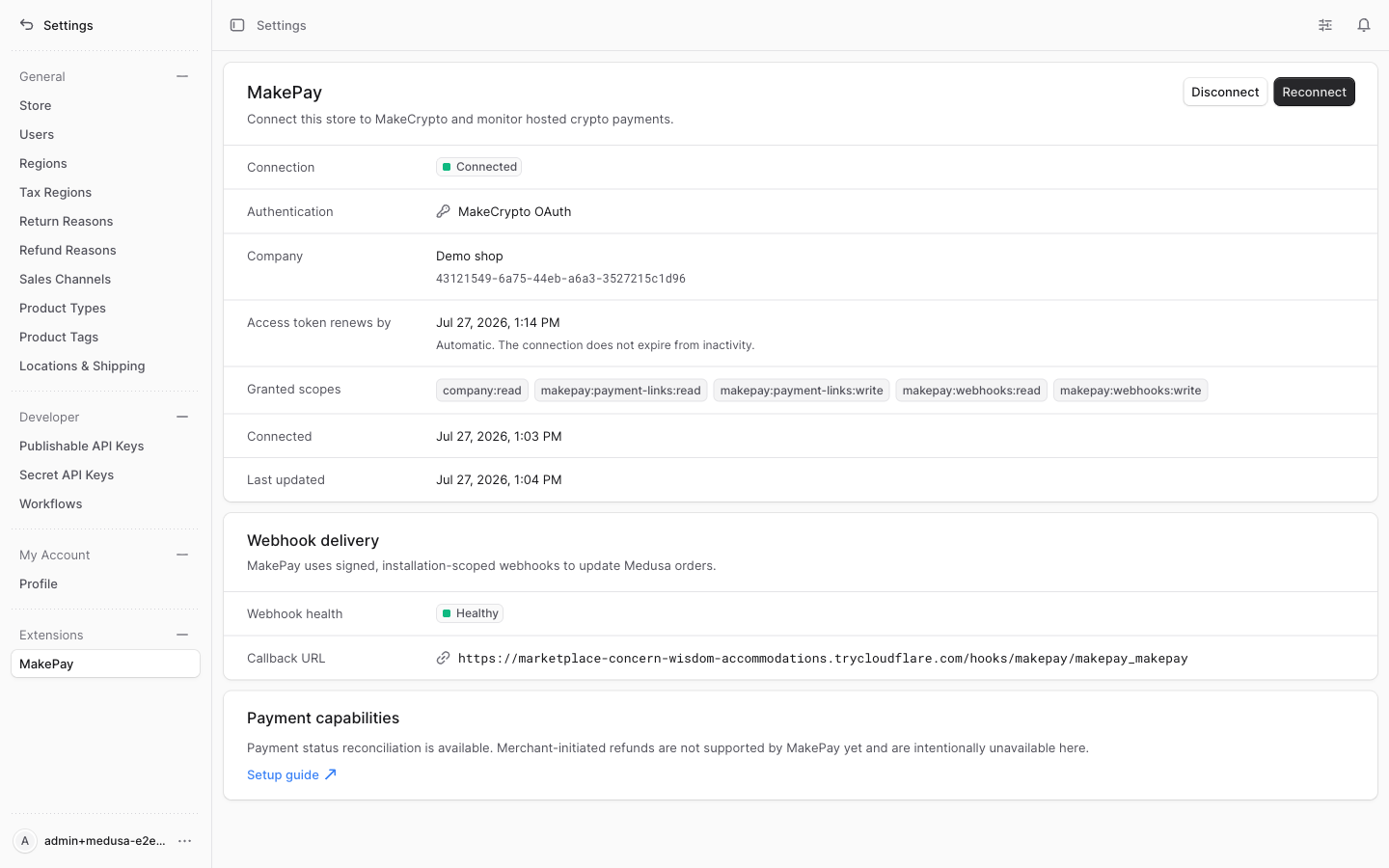
Medusa Admin MakePay settings connected to a sandbox company with OAuth and installation webhook health.
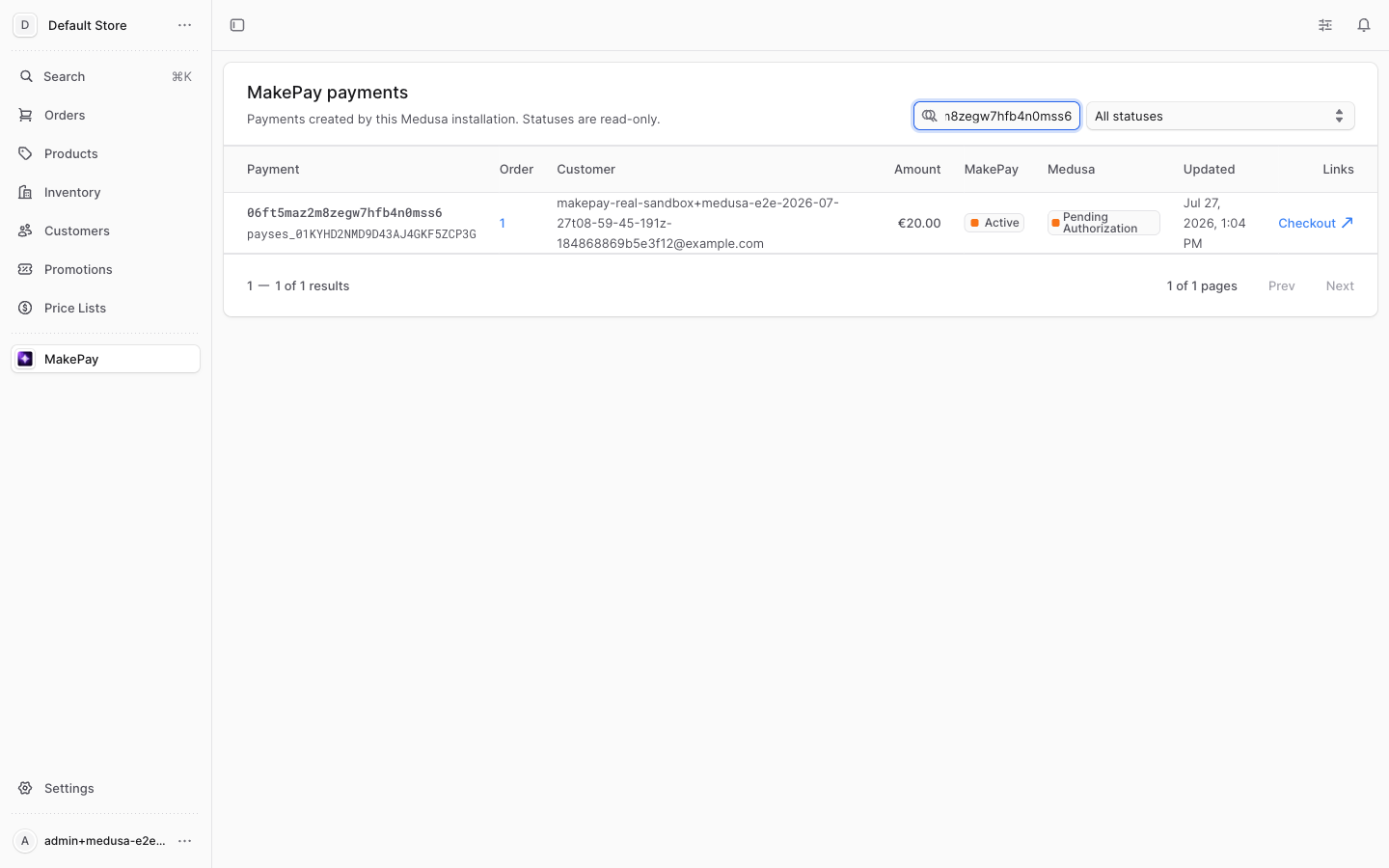
Medusa Admin MakePay payment list showing the installation-scoped local payment projection.
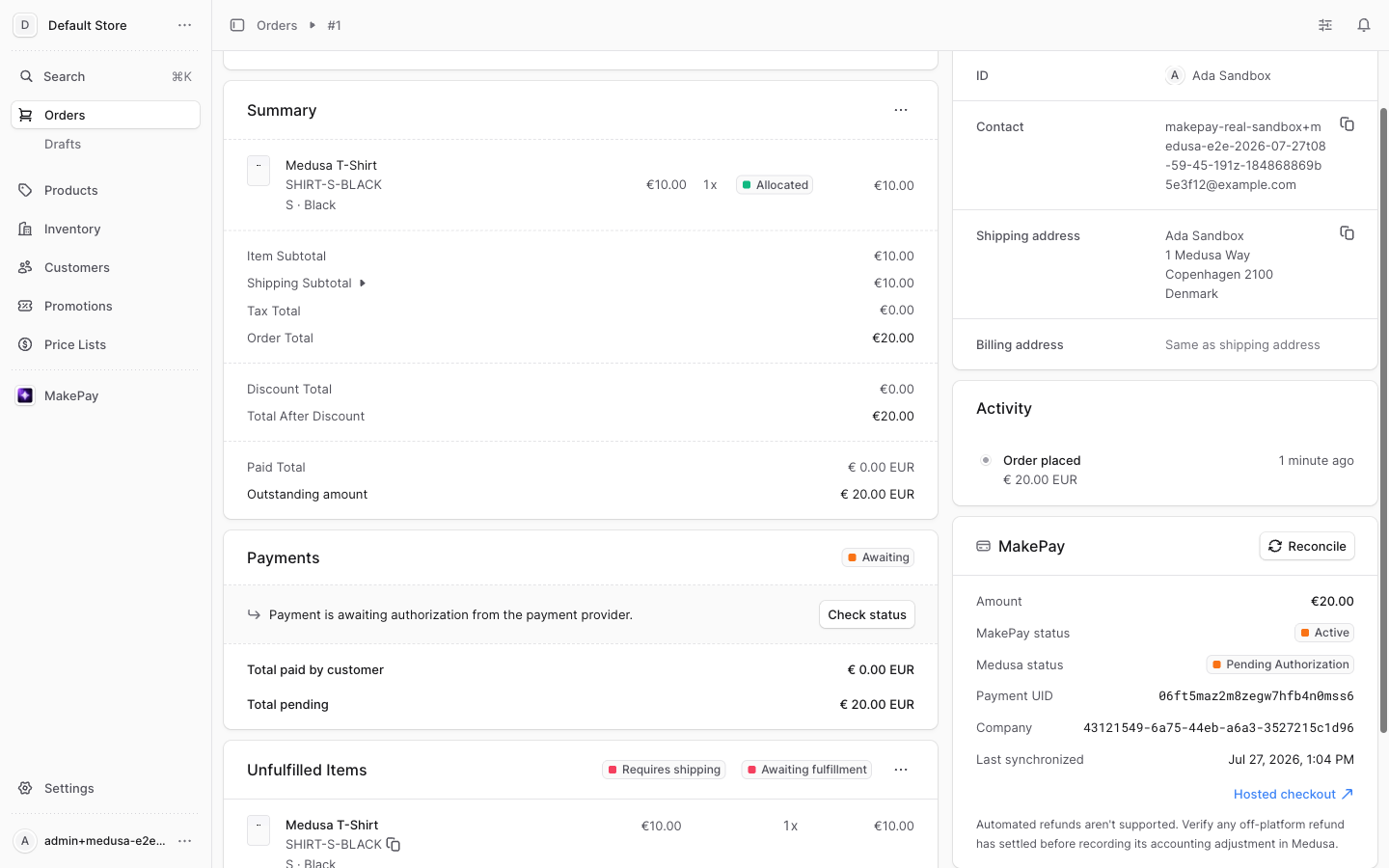
Medusa order details showing the MakePay payment widget and read-only reconciliation controls.
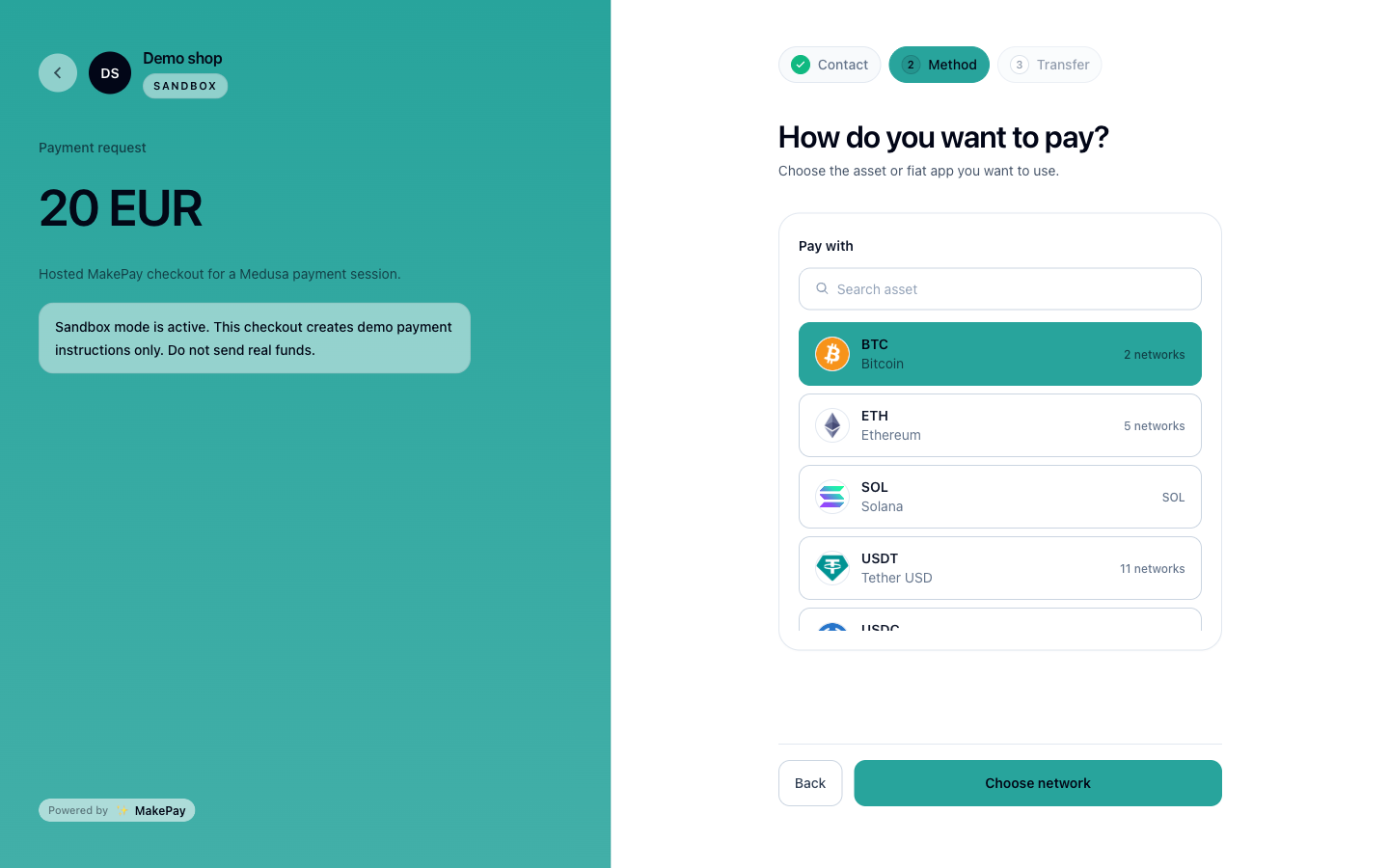
MakePay sandbox hosted checkout opened from the Medusa storefront order flow.
Upgrade from 0.2.0
Version 1.0.0 intentionally follows the previously published 0.2.0.
Upgrade in staging first:
- Back up the Medusa database and current MakePay environment variables.
- Stop creating new MakePay sessions and drain every
0.2.0link. A remote session is not safely drained merely because it says failed, expired, or cancelled: a late deposit can still complete. Resolve it to paid or obtain MakePay confirmation that no payment session can settle before upgrading. Version1.0.0adds projections but does not bulk-backfill unresolved links that predate those rows. It has a narrowly authenticated recovery fallback for an exact default-provider API-key link whose signed callback, authoritative MakePay snapshot, and Medusa payment session all match. Treat that path only as defense in depth: custom provider IDs or incomplete legacy metadata do not qualify, and it does not replace the mandatory pre-upgrade drain. - Install
1.0.0, addbackendUrlandstorefrontReturnUrl, and keep the existing key credentials for the first restart. - Run
npx medusa db:migrateand a production Medusa build. - Confirm every storefront region still contains
pp_makepay_makepayand complete one API-key-mode checkout. - Drain that API-key checkout and every other API-key projection. Exact
completemust have the matching Medusa paid side effect. A failed, expired, or ordinarily cancelled projection that had a remote session remains undrained; only an atomic no-session archive plus Medusa canceled is safe. Stop every old API-key worker, addMAKEPAY_ENCRYPTION_KEYand the shared distributedlockingProvider, switch all workers to OAuth mode, restart them, and connect from Settings > MakePay. - Keep old API credentials available for rollback until OAuth checkout and webhook delivery have both passed. Then revoke credentials that are no longer used.
Existing orders and payment sessions remain readable. New payment-session data
contains only a safe public projection; code that depended on undocumented
rawResponse or latestSession objects must instead use the Admin view,
payment detail, or reconciliation endpoint.
Status and refunds
| MakePay state | Medusa behavior |
|---|---|
| New hosted link | pending_authorization; create the order before redirect |
| Quote, deposit, swap, send, or underpaid review | Keep the order open and unpaid |
complete | Authorize/capture the payment and mark the order paid exactly once |
failed | Record a failed payment attempt; leave the order unpaid |
expired or cancelled | End the pending session; leave the order unpaid |
Unknown aliases, including refunded | Reject the event without changing the order |
An exact, signed, fully correlated complete is the only terminal upgrade
allowed after failed, expired, or cancelled. It runs Medusa's standard
successful-payment workflow against the original session exactly once. Once
paid, reordered unsuccessful events cannot downgrade the payment.
MakePay does not currently expose a safe merchant-initiated refund API. The plugin therefore returns a clear unsupported error for automated refund calls, and its custom Admin views do not show refund or cancel actions. Handle a required refund through the merchant support and accounting workflow; do not mark it complete in Medusa until settlement has actually been returned.
Troubleshooting
MakePay does not appear at checkout
Confirm the cart's exact region.id has pp_makepay_makepay enabled, the
plugin loaded at backend startup, and the storefront uses the correct
publishable API key. Call
GET /store/payment-providers?region_id=<cart.region.id> from the storefront
runtime. If it includes MakePay but the UI does not, invalidate the official
starter's provider cache, retrieve the cart again, and reload or re-enter
checkout. Update/recreate the cart only if its region is wrong.
Checkout reports Failed to fetch
Test Medusa backend health from the storefront runtime, then verify its backend
URL, DNS, TLS, tunnel, and process state. If health succeeds but the exact
region provider endpoint omits MakePay, enable it on that region. If the
endpoint includes MakePay but the UI does not, invalidate the provider cache
and retrieve the cart again. If MakePay is visible but payment-session
initiation fails, inspect that HTTP response and Medusa backend logs and
confirm the OAuth/API-key connection is healthy. The official Next.js starter
performs these calls server-side, so browser CORS is not its likely cause. A
custom storefront that calls Medusa directly from the browser must also use
HTTPS without mixed content and include its origin in Medusa storeCors.
OAuth cannot start or return
Confirm MAKEPAY_BACKEND_URL is an absolute HTTPS URL (or localhost during
development), its origin matches the OAuth callback, and the encryption key
decodes to exactly 32 bytes. Confirm issuer/API overrides use
https://www.makecrypto.io rather than its redirecting apex host. Reconnect
after changing any public URL.
OAuth token recovery unavailable (recovery_expired)
Authorization-code response recovery remains intentionally bounded. For an
official Medusa installation, each rotating-refresh response is recoverable
durably until its successor refresh token is successfully used; normal idle
time does not expire the OAuth connection or that recovery record. A
recovery_expired result during refresh therefore means the durable recovery
record is missing, corrupt, undecryptable after key loss, or was removed by an
operator—not that a normal timeout elapsed. In Settings > MakePay, select
Reconnect MakePay and authorize a fresh token family. Checkout remains
unavailable until reconnect completes. Do not delete the connection row,
encryption key, or historical payment records: they are still needed to
authenticate and reconcile already-issued links.
Disconnect remains pending
disconnect_pending means MakePay could not confirm the remote subscription
disable/preservation proof or token revocation. The plugin deliberately
retains encrypted connection credentials and the durable reset mutation
identity so an operator can resume the same operation after a lost response.
MakeCrypto replays the matching reset receipt before the plugin clears local
active authority. Restore connectivity or correct the issuer/API origin, then
select Disconnect again; do not delete the local row or encryption key
before remote revocation succeeds.
After disconnect succeeds, an encrypted historical subscription credential may remain for exact already-issued payments. This is expected and does not mean the installation can create new links or that active OAuth tokens remain.
The order stays awaiting payment
Open Settings > MakePay and compare webhook health and callback URL with the
running backend. Inspect the MakePay payment UID in the MakePay Admin list
(default /app/makepay). If Reconcile is shown, use it; otherwise restore
the configured distributed locking provider first. Fix webhook delivery rather
than trusting the storefront return URL as proof of payment.
Webhooks are rejected
Ensure the route receives the raw body, the signing secret belongs to this installation, and no reverse proxy rewrites the payload. Check amount, currency, order/session ID, installation ID, and delivery-group logs.
Checkout redirects in a loop
The storefront should redirect only from a newly created MakePay session. The return page should retrieve/poll the pending order; it must not recreate the payment session or call cart completion again.
The cart changed after MakePay selection
Retrieve the refreshed cart and initiate a new Medusa payment session. Do not update the issued session to change its amount or currency: its MakePay UID is immutable. If the earlier attempt may already contain funds, reconcile it before creating another attempt.
A refund action fails
This is expected in 1.0.0. Automated provider refunds are deliberately
unsupported until MakePay offers a merchant refund API.